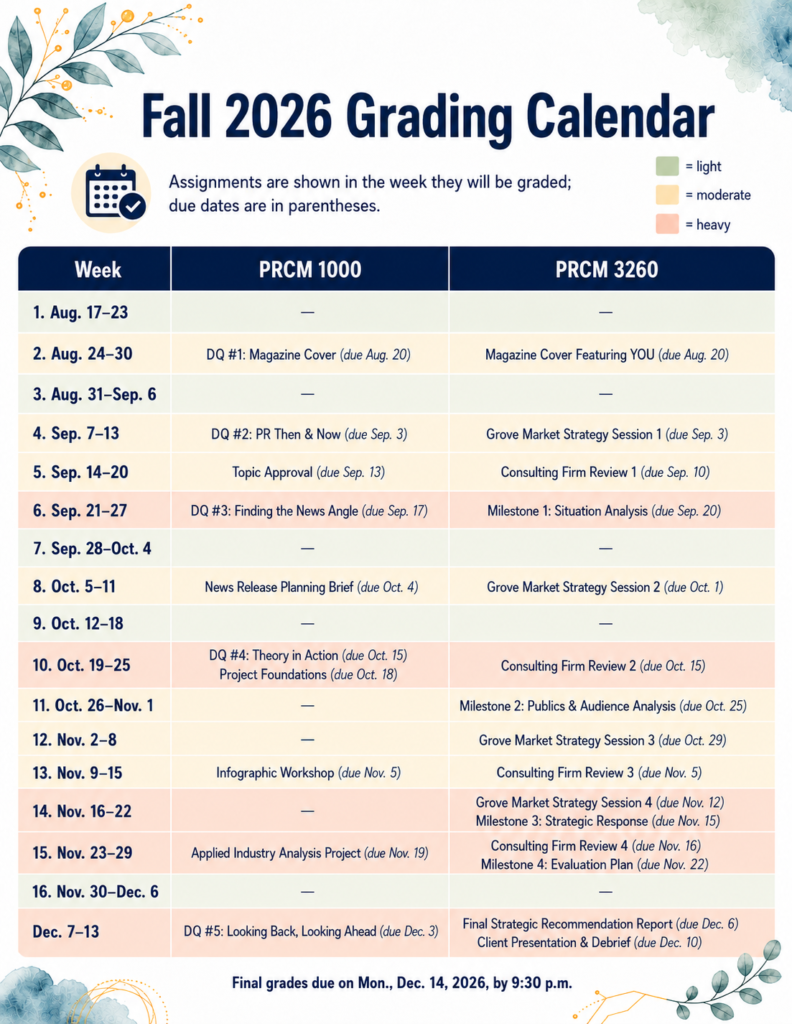
Every semester, I know there will be busy grading weeks. What I don’t always know ahead of time is exactly when those weeks will hit. This fall, I decided to map out my grading workload before classes even began. I printed the Modules pages from Canvas for my courses, gave them to ChatGPT and asked it to help me identify which weeks would be light, moderate or heavy for grading. The result was a simple grading calendar that shows not when assignments are due, but when I’ll actually be grading them. It turned out to be a surprisingly useful way to see the semester at a glance.
Ask AI to Help
Here’s what you can add to your favorite GenAI. Adapt it as needed for your courses.
I want you to create a semester grading calendar for my courses.
I will provide the Canvas Modules pages, which I printed as PDFs because they include the assignments, due dates and the weeks/modules where everything appears.
Please:
- Identify all assignments that require manual grading.
- Ignore anything titled Quiz or anything else that is automatically graded in Canvas.
- Assume that assignments will generally be graded the week after they are due.
- Place each assignment in the week when I will actually grade it, but keep the original due date in parentheses.
- Include week numbers in the Week column.
- Create one column for each course.
- If I provide enrollment numbers, use them when judging the grading workload.
- Rate each grading week as light, moderate or heavy, considering both the number of submissions and how substantial the assignments are.
Before creating the graphic, show me the grading calendar in table form so I can verify that the assignments are in the correct grading weeks.
After I approve the table, create a clean infographic-style calendar that:
- Prints nicely on 8.5 x 11 paper
- Uses Montserrat or a similar clean sans-serif font
- Uses sage green for light, soft gold for moderate and soft coral for heavy
- Colors the entire row according to the actual grading workload for that week
- Includes a small workload legend
- Includes this note near the top:
Assignments are shown in the week they will be graded; due dates are in parentheses. - Includes any final grade deadline I provide at the bottom
Keep the design clean, professional and easy to scan.