Image Credit: "Historic Route 101" by Leo Reynolds
Students in most of my classes have blogging as a component of their grades. Many of them have rarely even read blogs, no less written one of their own. In this post, I am combining many posts I’ve previously written to help them get started in WordPress.
1
Review the slides in my “Getting Started in WordPress” presentation below. In this presentation, you’ll learn
Blogging Do’s & No-No’s
Signing Up for Your WordPress Account
Setting Up Your Account
Writing Posts & Pages
How to Display Your Blog Comments (that you write on others’ blogs)
Watch some of the many FAQ screencasts provided by WordPress to help you with the step-by-step instructions. (Though some of the videos are for previous versions of WordPress, most of the functionality remains the same.) Here are a few of the best ones to help you get started on the right foot:
3-5-3 :: Blog Feedback for #PRCA2330 and #PRCA3330 (written for my students this past summer; the links in the post may take you to pages I wrote for other classes, but the content of the post is valuable)
4
And though you may have a good handle on the technical aspects of blogging, remember that the technical side is only part of the blogging equation. Corinne Weisgerber, a professor at St. Edward’s University and fellow PROpenMic member, created this presentation for her Social Media for PR class. The emphasis? How blogging can help you create your personal brand online. Take a look. It’s worth the time.
In COMM 4633 (Social Media for PR), we’ll all blog about the same topic each week during the semester. Your TOWs should be posted by Sunday midnight at the end of each week.
Some weeks have more than one topic listed; choose one of the available topics on those weeks.
If you have a topic to suggest, please add it as a comment to this blog post.
If you are unsure how to get started writing these TOWs, many times you can use this three-pronged approach:
What did you learn?
What surprised you?
What do you want to know more about?
WEEK ONE
Which types of social media you currently participate in (such as blogging, podcasting, social networking, etc.), which platforms you use, and why? Which platforms have you considered, but haven’t yet tried?
WEEK TWO
Why is it important to include images in blog posts? What are some approaches to choosing effective images and ensuring that you have the right to use them in a post?
WEEK THREE
Is social media monitoring ethical? Provide commentary and discussion on both sides of the issue, and offer your personal viewpoint.
WEEK FOUR
Write a post related to your assigned chapter in Groundswell. Provide links to several of the examples mentioned in your chapter, or to new sites that relate to the chapter. See if you can find a YouTube video or SlideShare presentation and embed it in your post. (Remember to link to the book, either at Amazon.com or at the publisher’s website/blog.)
WEEK FIVE
Which Super Bowl ad was either your favorite OR least favorite? Embed the ad in your blog. And in your discussion of the ad, be sure to discuss the publics that were targeted in the ad. (Be sure your readers can tell if you liked or disliked the ad.)
OR
Adam Vincenzini asked on Twitter and on his blog for people to share their definitions of “social media” with him, in 140 characters or fewer. Read through the list of definitions that were shared with Adam. Pick a few that resonate with you and discuss why these definitions “work” for you. Develop your OWN 140-character definition of social media. Tweet your definition, and embed the tweet in your blog.
WEEK SIX
“Social Media: Friend or Foe?” :: Listen to Shel Holtz, Mark Ragan and others discuss “concerns and objections around the adoption of social media communication channel.” React to it using the three-pronged approach, discussed earlier in this blog post. (NOTE: Mark Ragan is playing the role of an executive who is unsure if social media is right for his organization.)
WEEK SEVEN
Participate in a public relations or social media Twitter chat. Petya Georgieva provides a list of 13 possibilities at her Higher & Higher blog. (I highly recommend #PRStudChat, which meets on January 18 and February 15, but you are free to chose from any of the 13 options.) Before you participate in the chat, be sure to read Shonali Burke’s tips for how to make the most of a Twitter chat. After the chat, briefly describe the purpose and intended audience of your chosen chat. React to your own participation in the chat using the three-pronged approach (discussed earlier in this blog post).
WEEK EIGHT
Since our focus for this week is podcasting, write this week’s TOW on something related to podcasting. Potential areas for discussion include: what would drive an organization to choose a podcast as a way of connecting with its internal or external publics, the importance of shownotes, technology you can use for podcasting or how PR majors can benefit from listening to PR podcasts.
WEEK NINE
This week’s topic was inspired by Adam Vincenzini’s Be My Guest month: post something by a guest blogger. Connect with another blogger (it can, but doesn’t have to, be someone in your class) and exchange blog posts for the week. (You don’t have to write something new . . . share your favorite post you’ve written this semester.) In your own blog, make it really clear that the post is written by another person, and link to your guest’s blog.
WEEK TEN
What is this Foursquare thing that we keep seeing in our Twitterstreams? How can companies benefit from it? And what are some of the potential dangers of using Foursquare (and other location-based services) for individual participants?
OR
Pinterest has taken the Internet by storm in the past few months. What is it, and how can (some) companies or organizations benefit from using Pinterest?
WEEK ELEVEN
Set up an account at Diigo, a social bookmarking site. Create social bookmarks to at least 20 sites; these could include classmates’ blogs, PR blogs, your university, your favorite musical artist or actor, etc. In your Topic of the Week, share a link to your Diigo account. Discuss how college students (especially those working in groups) could benefit from social bookmarks. Be sure to include a link to your Diigo bookmarks in your blog post. Optional: how could an association, like the Florida Public Relations Association or the International Listening Association, use social bookmarks to benefit its members?
WEEK 12
One of this week’s readings concerned widgets and badges. After briefly describing the difference between a widget and a badge, offer suggestions on how one specific organization you are a part of (or wish to become a part of) could benefit from using widgets or badges.
WEEK 13
Just what is it that makes a simple little video like “David After Dentist” become a Viral Video? Also, embed at least two of your favorite videos that went viral and explain why you chose them.
WEEK 14
Of all the professional and peer blogs you read (and commented on) this semester, which ones are your favorites? Pick at least one from each category (professional and peer), and explain why you chose them.
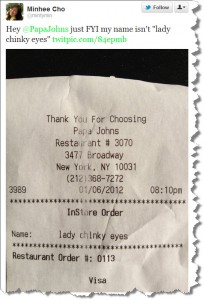
You’d think that businesses, especially large ones that have a social media presence, would realize by now that social media is 24/7. Apparently, Papa John’s didn’t get the memo.
Minhee Cho, Communication Manager at ProPublica, posted her receipt from her last night’s pizza order at about noon today. Retweets and comments about her treatment from this Papa John’s employee started swirling.
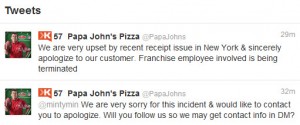
And they swirled for nearly seven hours before Papa John’s responded via Twitter. Luckily, the Papa John’s (tardy) response is an appropriate one, at least in my book.
But here’s the thing: I wonder how many people will continue to retweet Ms. Cho’s original tweet, and never even know that Papa John’s apologized and explained its course of action? Here’s a link to a Twitter search for #papajohns OR @papajohns.
Something to think about, especially for brands with broad name recognition.
Syllabi for my two Spring 2012 on-campus classes are available at my Scribd site. If a syllabus is updated during the semester, you’ll find out in class, and the current version will always be available at Scribd.
So that we can make the most of this semester, please (Please, PLEASE) take some time to read through the blog posts I’ve included here. I promise you, it will be well worth your time. (How often do professors let you get inside their heads, letting you know their tips for success and their pet peeves?)
When communicating with me via e-mail (or Facebook), always put your course number (such as COMM 4333) in the subject line to help me immediately identify who you are and frame your questions or comments. Do your best to write in full sentences, paying attention to standard English grammar and spelling. Always sign your e-mails with your first and last name, as your e-mail address will not make that readily apparent to me.
When submitting an assignment in BlackBoard, always put your last name as part of the file name, and also include your name in the document itself. Papers submitted without your last name as part of the file name cannot earn full credit.
If an assignment is due in BlackBoard, the only way to get full credit for the assignment is to submit it in BlackBoard. (E-mailing an assignment to me can be risky; I receive 250+ e-mails a day, and there’s a chance I will not even see it in my inbox.)
(PS: If you’re one of my Spring 2012 students reading this post, please leave a reply to this post so that I can know you have read it. If your reply doesn’t show up immediately, no worries — I may need to approve it before it appears, if you’ve never commented on my blog before.)
My Southeastern University class created this list of 26 things people should know about writing for digital media. Some focused on writing for digital media in general, while others focused on succeeding in her class of the same name. (Note: A couple of the letters are missing, as Twitter is being a wee bit wonky this morning. I will do my best to add in D and M as soon as I can.)
“
In just a bit, my #COMM2423 class will be tweeting the ABCs of Writing for Digital Media. (I’ll make a Storify of this later.)
In Public Relations Applications this semester, students will be delivering five-minute presentations on an assigned public relations field or industry. Three students are assigned to each chapter; they can divide up the material in the chapter as they see fit.
The subject areas are:
Events & promotions
Global public relations
Corporate public relations
Entertainment, sports & tourism
Government & politics
Nonprofit, health & education
We want to be sure to avoid the dreaded Death by PowerPoint, so ably described by comedian Don McMillan below.
In class on October 27, we’re discussing how their favorite movies can make them better public speakers. (For example, I learned in The Wizard of Oz that being the loudest one in the room — the Wicked Witch of the West — doesn’t necessarily make me a speaker who people want to listen to.) Students will share their thoughts in the comments below.
For COMM 2423: A Reminder of the Assignment Requirements (found in your syllabus)
Report, source, write, edit and post one news story on an approved topic. The article must have or rely upon at least three human sources. The more timely, the better, and the story should hit demonstrate impact or consequence. Beware, however, of conflicts of interest. This means avoiding friends, family members and business associates as sources, and stories that could materially affect those companies and entities with which you are affiliated.
Post with the story the questions you asked your sources, a list of the facts you checked and verified, and a list of the sources you attempted to contact (not merely those you were able to include in your story). Also identify your intended audience(s).
As you are completing this assignment, think about what might be added to your main story for publication online, including multimedia and interactive features. Because online you would have all the space you would need, consider the range of added features that could be developed, including fact boxes, a FAQ list, a podcast or video extra, interview notes and transcripts, maps, charts, a glossary, slideshow, animated graphic, poll, related stories and opinion, and perhaps an area where readers can contribute reactions, story ideas, photos and comments. For Feature Story #2 you will add at least one photo and two other multimedia/interactive elements that might make a strong story package online. (For Feature Story #1, one photo is the only multimedia element required.)
Image Credit: "Montreal Twestival 2009 Cupcakes" by Clever
This week, spend some time learning on your own about using Twitter. Here are a few ways to learn. We’ll talk more about Twitter next week in class. Be sure to follow the directions in Step 4 so you “take attendance” for class this week; you can send the required tweet/message anytime before midnight on Saturday.
Step 1: Watch
If you haven’t seen it already, watch Twitter in Plain English, made by the folks at Common Craft:
Go to Twitter. Click Get Started, and sign up. I prefer it if you use some version of your first and last name as your Twitter ID. (Avoid putting numbers in your Twitter ID, or you may appear like a spammer.)
Upload a photo or avatar.
Write a brief (160-character or fewer) bio. It’s good to mention that you’re a PR student. Consider mentioning your university.
Send a tweet saying “I’m a student in @barbaranixon’s #COMM2322 /#COMM2423”. (Use the correct number for your class.) Be sure to include the #xxx1234 indicator, with no spaces between the hashtag (#), letters and numbers. It is by you sending this tweet that I will “take attendance” on Monday/Tuesday.
Step 5: Follow
Follow the people I recommend in my Starter Pack for PR Students list: — at least for the duration of this semester. I will also create lists for students in each of my classes (but I cannot do this until I have all your Twitter IDs.)
Additional Information
If you already have a Twitter account that you use primarily for social (not educational or professional) reasons, you may wish to create a fresh, new account for this class and professional reasons.
I find using the web interface for Twitter to be clunky. I prefer using TweetDeck, a free Adobe Air app that works great on PCs and Macs. TweetDeck makes it really easy to send URLs via Twitter, as it automatically shortens them for you.
I’ll occasionally post information on Twitter and use the hashtag for your class (#COMM2322 or #COMM2423).By using this hashtag, I’m indicating that I want students in this class to pay special attention to the tweet.
In pairs or triads, consider the website provided in class during Week 6. (Note: You can work on this assignment individually, if you wish.)
Imagine that you have been hired as the site’s new editor-in-chief. Make specific recommendations to improve the presentation of content at the site, integrating and referencing the chapter as much as possible. What elements or features promote use of the site? Again, think of all the elements described in this chapter. How are graphics and visuals incorporated, and do they encourage or discourage use? How do they do this? How much thought was given to navigation throughout the site? Are the elements — graphical, navigational and metaphorical — consistently applied throughout the site? Is the tone or rhythm of the site consistent throughout? Do these dimensions match the audience(s) for the site?
Here is a categorical checklist of site dimensions to critique:
Navigation
Page layouts (balance | contrast | unity)
Consistency
Tone and voice
Writing quality
Site organization
Prepare your written critique and submit it in BlackBoard before the deadline of Oct. 1 at 11:59 p.m.




 . Linden Publishing: Fresno, CA. (NOTE: Kindle version available.)
 . Boston, MA: Harvard Business Review Press. (NOTE: Kindle version available.)