Social Bookmarking in Plain English

Our topic this week in Social Media for PR is social bookmarking. Here’s an excellent, and short, explanation of what social bookmarking is, created by Lee and Sachi Lefever from Common Craft.

As the video is no longer available on YouTube, here’s a link to Social Bookmarking in Plain English at the Common Craft site.

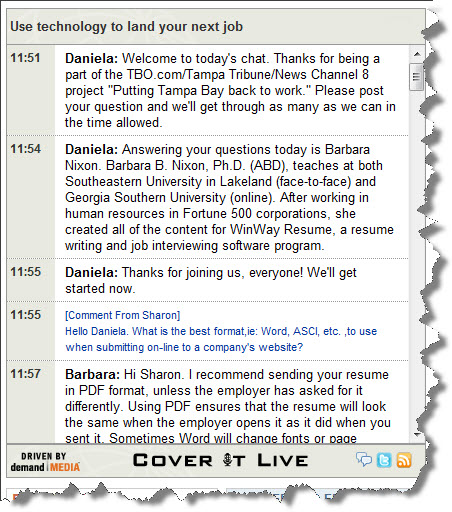
Use Technology to Land Your Next Job

Today I was invited by the Tampa Tribune and TBO.com to share my expertise regarding social media and the job search. Here’s a transcript of the live chat we held at noon, using CoverItLive.

Many thanks to Chris Taylor, AKA @TBOChris, for inviting me to the studio, to Daniela for moderating the chat, and to my longtime Twitter friend & Tampa Tribune writer Jeff Houck (@JeffHouck) for inviting me to lunch at The Taco Bus after the chat session.

Use technology to land your next job
11:51
Daniela:

Welcome to today’s chat. Thanks for being a part of the TBO.com/Tampa Tribune/News Channel 8 project “Putting Tampa Bay back to work.” Please post your question and we’ll get through as many as we can in the time allowed.

11:54
Daniela:

Answering your questions today is Barbara Nixon. Barbara B. Nixon, Ph.D. (ABD), teaches at both Southeastern University in Lakeland (face-to-face) and Georgia Southern University (online). After working in human resources in Fortune 500 corporations, she created all of the content for WinWay Resume, a resume writing and job interviewing software program.

11:55
Daniela:

Thanks for joining us, everyone! We’ll get started now.

11:55
[Comment From Sharon]

Hello Daniela. What is the best format,ie: Word, ASCI, etc. ,to use when submitting on-line to a company’s website?

11:57
Barbara:

Hi Sharon. I recommend sending your resume in PDF format, unless the employer has asked for it differently. Using PDF ensures that the resume will look the same when the employer opens it as it did when you sent it. Sometimes Word will change fonts or page breaks without warning, making your resume look odd. With the latest version of Word, you can easily Save As PDF. And ALWAYS open the PDF yourself, preferably from a different computer, for your own quality assurance.

11:57
[Comment From Andrea]

How can I best use Twitter to land a job?

11:58
Barbara:

Hi Andrea. There are a few ways you can use Twitter. Let me talk about a few of them for you.

11:59
Barbara:

One thing I highly recommend is for you to start following pros in the field in which you wish to work. See what they’re writing about. Respond to them. If they post links to their blogs, comment on the blogs.

12:00
How did you find out about this chat?
TBO.com homepage

( 14% )

News Channel 8

( 57% )

Tampa Tribune

( 0% )

Facebook

( 0% )

Twitter

( 29% )

Other

( 0% )
12:00
Barbara:

Another idea for using Twitter in the job search is to post a link to your resume. (I recommend creating a profile at LinkedIn, and link to that rather than your resume itself — just so that you can keep your address, phone, e-mail private).

12:01
Barbara:

You can connect Twitter to LinkedIn, so that your tweets also show up in LinkedIn, but do this judiciously. Most people don’t want EVERYTHING they tweet to appear on their professional profiles in LinkedIn.

12:03
Barbara:

If you’re a blogger, be sure to post links to your blog posts to Twitter — that is, if you think theese posts will help create a professional appearance for you in the eyes of a potential employer.

12:04
[Comment From Lauren]

If I were to sign up for ONE social site to try to get a job- which one do you recommend?

12:04
Daniela:

Thanks for the questions, folks. Keep ’em coming!

12:05
Barbara:

Hi Lauren. The one site I recommend more than any others for job searching is LinkedIn. Not only can you post your own profile/resume there, you can easily network with others. Your LinkedIn profile can be longer than the traditional, one-page resume.

12:05
Have you been using LinkedIn in your job search
Yes, I use it all the time.

( 17% )

No, I don’t even know what it is.

( 33% )

Sort of.. I created an account but don’t use it.

( 50% )
12:08
Barbara:

Lauren — here’s a link to a blog post I wrote earlier this year about using LinkedIn in the job search. The post was aimed at college students and recent grads, but others can benefit from LinkedIn as well. And feel free to connect with me at LinkedIn.

12:08
[Comment From Sharon]

Is this the same answers for Facebook, too?

12:09
Barbara:

Hi again, Sharon. Facebook… this can be both a blessing and a burden for job seekers.

12:12
Barbara:

Unless your Facebook profile is marked as Private to all but your closest, in-real-life friends, you’ll want to scour through everything you have out there and think “how could a potential employer possibly misinterpret this?”   Photos are especially problematic in Facebook. Just think about how much personal information you are showing a potential employer simply through what you’ve chosen to post in your photos. Most of this information (children, hobbies, night life) has no place in a hiring decision… yet it may be in the employer’s mind when/if you make it to an interview.

Also think about any Facebook groups that you have joined, perhaps on a whim. Some of them have names that are not conducive to making a professional impression.

12:15
Daniela:

Every week, we ask people to send questions to us so we can ask the expert.

David asked: I’m 49-year old owner of a small environmental consulting company that is barely afloat. I’ve been looking for a job to supplement my income. How can I use technology and social media to find something?

12:16
Daniela:

Barbara is working on this question right now.

12:17
Barbara:

Hi David.  If you’ve not joined LinkedIn yet, you should consider doing it now. Besides being able to post your profile there, you can also go into the Answers area and answer questions in your field. This will help promote you as an expert in your field.

12:18
[Comment From Sharon]

Good question from David!! I’m a newbie to all these social media sites!

12:19
Barbara:

Also, David, if you don’t yet have a blog, you might want to consider starting one. You could write something every week or so about a topic in your field.

12:21
Daniela:

Another one of our users, Melanie, asked this question: Where do you go online to find openings for truck drivers?

12:24
Barbara:

Hi Melanie. Though I don’t have a specific site that I would recommend for seeking truck driver positions, I have a contact in the field who I can ask. I’ll get back with you via e-mail about this. If you’re a Twitter user, you might also want to connect with @TruckerDesiree. She’s a good source, especially for women who are interested in joining the trucking industry.

12:26
[Comment From Sharon]

Do HR interviewers check all these sites when considering you for an interview? I’m not in a degreed professional field…I’m in Customer Service ,Call Center worker. Will this technology benefit me too??

12:28
Barbara:

Hi Sharon. Yes, you WILL be Googled. (Just think, a few years ago, that wasn’t even a word.) Employers will check online to see what they can find about you before determining whether to call you in for an interview. Your goal should be to have any information they find about you to be positive and professional. The more you write in a blog, add to LinkedIn, etc., the better it will be for you — especially if you have a common first and last name.

12:30
[Comment From Sheila Surla]

I’m not exactly a professional, I have done administrative work and it doesn’t have to be tied to any particular field. How do I market myself and set myself apart from the 100’s of others who do what I do?

12:34
Barbara:

Hi Sheila. If you’re a top-notch administrative assistant, there is a market for you. Try to think about which two or three fields interest you most, and focus your efforts there. I’ve mentioned LinkedIn here several times, and I’ll mention it again. Create a profile for yourself there, and go to the Answers area. See what questions people have that you can help with. Make a name for yourself there, and who knows, you may land a role as someone’s Virtual Assistant.

12:35
Daniela:

Martha, another one of our users, asked this: How do you use technology to find out when job fairs will be happening?

12:36
Barbara:

Hi Martha. If you’re looking for job fairs in your area, Google will help you more than almost anything. Type in “job fair” and the name of the city where you’re seeking employment. If you’re here in the Tampa Bay area, check out TBO.com or read the Sunday Tribune classifieds section. You may come across some ads for job fairs there.

12:36
Do you have a twitter account?
Yes, and I use it all the time.

( 50% )

Yes, but I never use it.

( 25% )

No, I need to create one.

( 0% )

No, and I don’t plan on creating one.

( 25% )
12:37
[Comment From Sheila Surla]

To add onto my previous question, I have no schooling for what I do, I’ve basically been picking up skills along my career path. I think this hurts me through my resume, will linkedin help show my skills better?

12:38
Barbara:

Hi again, Sheila. It sounds like you might have a traditional, chronological resume. You may want to consider using a functional resume instead.

The functional format organizes your skills and accomplishments into job task groupings that support your stated career objective. If you must pull together certain skills and accomplishments from a variety of past experiences to show your preparation for what you want to do in the future, then the functional format is probably for you. People who have been out of the workplace for several years —  for example, those people who choose to stay at home to raise a family while the children are young — benefit greatly from this format. It draws attention to what you did rather than when you did it. Another advantage of this format is that it allows you greater flexibility in presenting skills gained through personal experience or through low-paying or volunteer jobs.

12:42
Daniela:

We’re about to start wrapping up the chat, but Barbara’s going to give you all a few more helpful tidbits before we leave.

12:43
Barbara:

If you’re looking for some more advice on resume writing, you may want to take a look at Resumes That Resonate, a post I wrote at my Public Relations Matters blog. One of the keys I mention in that blog post is to pepper your resume with key words / terms that an employer might be looking for. And if you are writing a resume for a position where you know what the job description is, use as much of the specific terminology in the description as you reasonably can. It will help make you look tailored for the position.

12:44
[Comment From Sheila Surla]

I’m on the linkedin website now and it’s pulled up a bunch of people I’ve maybe just e-mailed about a job, should I go ahead and connect to them?

12:44
[Comment From Sharon]

Thank you, Barbara. You have given extremely good advice today.

12:44
Daniela:

Barbara’s going to take this last question from Sheila, then she’ll give you her follow-up before we sign off.

12:45
Daniela:

*follow-up information

12:46
Barbara:

Hi again Sheila. Absolutely… when you send the connection request to potential employers in LinkedIn, be sure to mention in the e-mail that you’re seeking employment with the company — rather than using the generic e-mail that LinkedIn provides. It’s always smart to provide context when you are asking to connect in LinkedIn (or elsewhere).

12:48
Barbara:

Thanks for all the great questions today. I’ve enjoyed chatting with you here. You can find me atLinkedInTwitter, or my Public Relations Matters blog.

12:48
Daniela:

Thank you all out there for participating! And thank you, Barbara, for being our resident expert today. Join us next Wednesday at noon for the next installement of “Putting Tampa Bay Back To Work.” In the meantime, good luck to all of you on your job search.

12:49
[Comment From Andrea]

Thank you!!

12:50
[Comment From Sharon]

Thank you. Good bye all —and good luck!!


Communication for PR Practitioners

In this week’s Public Relations Applications class, we are discussing communication for PR practitioners. Here are the slides I will use:

An Interview with Martin Waxman

Martin Waxman, president and co-founder of Palette Public Relations Inc., took 25 minutes out of his hectic pre-SXSW schedule to chat with me this morning about life in a PR agency, the importance of a traditional PR background (along with social media knowledge), and our digital footprints.

View on screencast.com »

9 Ways to Make the Most of #Listen10

Just I have done for most of the last 20 years, I will be attending and presenting at the International Listening Association convention again this year.

Last week, USA Today’s Brian Dresher posted his tips on making the most of South by Southwest. These were great tips. I asked him if I could borrow liberally from them, and he said “sure thing.” So here goes.

  1. Don’t feel compelled to attend a session at every time one is offered. If you do that, it’s a quick recipe for listener burnout. (And I should know. I used to think it was impolite to sit out a session or two. Now I realize it’s more impolite to be zombie-like in a session than it is to be absent from a session.)
  2. Plan ahead to meet informally with the people you need to see. Check the program to see who is presenting and chairing; that will help you know who will be there.  Realize that the presenters and chairs will be fairly busy right before and after their sessions.
  3. Stay healthy. Make wise choices about your meals and snacks, and drink plenty of water. I usually buy a case of water to keep in my hotel room and make it a goal to finish it off before the conference is over.
  4. Attend a panel or presentation outside your usual area of interest. If you’re an academic, try some of the business panels. If you’re in the helping professions, see what the K-12 educators have to say.
  5. Say hello! ILA members are among the friendliest people I’ve come across. Even if this is your first ILA convention, feel free to introduce yourself. You might even get a hug (that’s a warning).
  6. Arrive early to the popular panels. Sit near the front so you can really engage with the presenters.
  7. Bring a power strip. You can make LOTS of friends, especially in airports, if you are willing to share your power with others.
  8. Bring lots of business cards. Even in this mostly electronic age of ours, one of the best ways to exchange contact information is through a business card. I make my own, and I include my photo on the back, to make it easier for people to connect my name and face.
  9. After the conference, send thank you notes to presenters who made an impact on you. And when I say “thank you note,” I don’t mean an e-mail. I mean a real, handwritten and mailed via USPS note.

So, those are my 9 best tips for making the most of the International Listening Association convention. Do you have a 10th tip to offer?

(PS — I bet these tips would hold true for most communication-related conventions, too.)

Public Relations Program Planning :: FAQs

In my Public Relations Applications class, we’re discussing public relations program planning this week. Here are the slides I used:

Public Relations Program Planning

To see some of the notes I used for the presentation, visit SlideShare and download the presentation.

Writing a Personality Profile

For my PRCA 3330 and COMM 4333 classes:

Want to show your publics the human side of your organization?

Write a personality profile.

For this assignment, write a personality profile about someone associated with your client’s organization. It could be about a leader in the organization, a member or maybe even a client. However, it must be about a real person (though not about you).

Chapter 7 in your Public Relations Writing & Media Techniques textbook provides a good overview of a personality profile on pages 173-174. Additionally, see pages 175-179 for more information on writing a feature story in general.

Keep these things in mind:

  • Use letterhead from your client for the personality profile (just like you would for a news release)
  • Include pertinent contact information (just like you would for a news release)
  • Write a catchy headline (just like you would for a news release)
  • Be creative, not mechanical, with your lead (see p. 177 for suggestions)
  • Use AP style and standard English grammar (though you can get away with occasional phrases, rather than complete sentences, for dramatic effect)
  • Your personality profile will be much longer than most news releases. Aim for a story between 750-1000 words.
  • Since you also have an assignment of a photo with caption due when this personality profile is due, why not take a photo of the subject of your personality profile when you are interviewing him or her?
  • Consider posting your personality profile on your blog (not required), after you get your graded assignment back

Check your syllabus for the due date for this assignment.

(NOTE: It’s a good idea to read 8-10 personality profiles from your favorite newspapers and magazines before you write your first one.)

Creating a Media Advisory

For my PRCA 3330 and COMM 4333 classes:

As a public relations writer, one of the collateral pieces you are likely to be writing is a media advisory. A media advisory (or media alert) is designed to encourage a reporter to come and cover an event.

Chapter 6 in your Public Relations Writing & Media Techniques textbook provides a good overview of the contents of a media advisory. See pages 144-146 for details.

That said, with your client in mind, create a media advisory for an upcoming event. Though it’s ideal if this is for a real event, if your client does not have one planned in the near future, you can use your creativity to write about an imaginary event.

When structuring your media advisory, make it as simple as possible for the reporter to find the details. Keep these things in mind:

  • Use letterhead from your client for the media advisory (just like you would for a news release)
  • Include pertinent contact information (just like you would for a news release)
  • Write a catchy headline (just like you would for a news release)
  • Provide a brief opening paragraph with your story idea
  • Create headings including the 5 W’s:
    • Who
    • What
    • Where
    • When
    • Why (Tip: this one is perhaps the most important. This is where you will use your persuasive writing abilities to convince the reporter that the story is newsworthy.)

Check your syllabus for the due date for this assignment.

(NOTE: You can see many, many sample media advisories online by Googling “media advisory sample” or “media alert sample.” I cannot vouch for the content of all of them, but it would be good for you to see them to get a feel for how they look and read.)

FAQs About Blogs, Spring 2010

We’re now about halfway through Spring 2010, and I see some students are still struggling with their blogs.

I promise that this blog assignment was not designed as 21st century version of a medieval torture device for you. Writing (and blogging) is a daily part of a PR practitioner’s life; I am helping you prepare for your careers. And the more you write, the better writer you will become.

Here are some of the frequently asked questions.

How was I supposed to know what to put in my blog? I feel so far behind.

Early in the semester, you were given your blogging guidelines for your class. All the information has been in there for nearly two months now.

Can I work ahead on my Topic of the Week?

I typically share the Topic of the Week for your class on Monday or Tuesday of the week it’s due.

If I am in more than one class with you, can I just do Topic of the Week for one of the classes and have it count for both?

No. The topics are different in each class.

If we didn’t have a reading assignment for a week or two, what should I do for Reading Notes for that week?

If you didn’t have an assignment, you don’t need to create notes.

How long do my Reading Notes have to be? I am spending hours outlining the chapters.

See the blogging guidelines.

How do I know which week we are in? You don’t have specific dates listed on your blog.

See your syllabus. Week One was our first week of class.

Where can I get ideas for my PR Connections?

Read PR blogs. Or subscribe to Ragan’s PR Daily. Or listen to a PR podcast.

What can I do to get more comments on my blog?

Buddy up with students in your class (or one of my other classes), and commit to commenting on each others’ blogs. If you’d like a “blog pal” from another university, let me know, and I can connect you.

Where can I find pictures to add to my blog (without getting into trouble)?

Go to Compfight, then choose “Only” next to Creative Commons. When you search for images that way, only ones that are okay to use will come up.

I’m still confused about how to track my blog comments. Can you go over that one more time?

See Tracking Your Blog Comments for Nixon’s Classes, originally posted on January 13.  See Lisa McLaughlin’s blog for a great example of what I am looking for.

How do I make my picture/avatar show up when I leave comments on others’ blogs?

Create a Gravatar.