
Making the Most of a Phone Interview
In these days of travel budgets being slashed to bare bones, many companies are doing more phone interviews than ever. If you’re seeking a new job, it’s highly likely one of your first interviews with a company will be over the telephone. Here’s some of my best advice on making the most of a phone interview:
Before the Interview
- Know the details of the interview. For example, do you call the interviewer? Or does he or she call you? Be prepared at least 15 minutes ahead of time, and be aware of time-zone differences.
- Connect with the interviewer via LinkedIn before the interview. Print a copy of the interviewer’s photo and have it available during the call.
- Whether it’s a cell phone or a landline phone, check to see that the battery is fully charged before you begin to speak.
- Do your best to be in a quiet place, away from coffee shop chatter, noisy roommates, barking dogs, etc.
- Silence your cell phone and tablet so that notification noises do not distract you or your interviewer.
- If at all possible, make or take the call from a landline telephone, rather than a cell phone. You don’t want to have to worry about your call being dropped part-way through. If you must use a cell phone, be sure you’re in an area with exceptionally good coverage.
- Dress professionally, even though you know the interviewer cannot see you through the phone. We tend to act more professional when we appear more professional.
- Prepare your interview area carefully. Be seated at a clean desk, and have a copy of your resume in front of you. Also have information about the company printed and available for you to refer to if you need it.
- Have a cup of water with a straw nearby. It’s best to have no ice.
- If the interview is done via Skype (or other) video chat, check your equipment with a friend ahead of time to ensure you know how to make or answer the video call. Make eye contact with the camera just as though you were talking face-to-face with the interviewer. Practice this with a friend! It feels quite awkward the first time you try it.
During the Interview
- Listen carefully to all questions and ask for clarification when needed.
- Look at the interviewer’s photo during the conversation.
- Take notes as needed during the interview.
- SMILE! Though the interviewer cannot see you, he or she will be able to hear the smile in your voice.
- Some people sound more energetic if they talk while standing rather than sitting.
- No gum chewing. Though I love to chew gum, I know how awful it sounds to others, and the noise is amplified over a telephone.
- Avoid typing while talking, especially if you have long nails like I do. The sound of typing may make it sound like you’re not interested enough in the discussion to give it full attention.
- As the interview draws to a close, express your interest in the role and ask what the next steps in the process are.
After the Interview
- Immediately after the phone interview, send a short (yet professional) thank you e-mail to the interviewer. Then follow up that e-mail, the same day if possible, with a hand-written thank you note.
Other Suggestions
What other tips would you offer for someone who will be participating in a phone interview?
How to Complete Online Job Applications Without Pulling Out Your (Virtual) Hair
 After a little more than five years working with a software company, my position was eliminated, and I found myself in an unexpected state of “retirement.” And “retirement” for me means spending my days searching for what’s next.
Virtually all companies now have you complete an online job application, and some of these applications can take up to an hour to complete. Additionally, some of these applications have screening questions that you must answer before you can submit your application.
Here are some tips to help you complete online job applications:
- Have one folder on your computer that has just these files in it. This will make it easier for you to find the most current versions. (Move older versions to a subfolder.)
- Resume (Word and PDF)
- References (Word and PDF)
- Transcript (PDF only)
- Q and A (Word only)
- In your Q and A file, keep a running log of the screening questions that you are asked and your responses to these questions. If a new application asks new questions, add them to the file.
- By writing your answers to screening questions in a Word document, rather than directly in the online application, you’ll be able to more easily see any errors that have slipped in.
- You can often repurpose previous responses with only minor edits.
- Read your responses aloud to ensure that the words flow smoothly.
- Carefully copy your responses from Word and paste into the application. Be sure you’re answering the correct question with your response.
- And if the application times out or errors out before you click Submit, you will have all of your responses saved in Word, so you won’t need to rewrite from scratch! (This tip alone has helped me keep from pulling out my virtual hair.)
- Typical screening questions are often similar to the following:
- Why do you want to work here? (Be sure to take a look at the company’s vision and mission statements, and then echo some of the company’s wording in your response.)
- Explain your experience and skills in X. (X will be something that comes from the job description. Use this space to address how your background matches with what the company’s requirements are. You may be asked this question multiple times to address several aspects of the job.)
What other tips would you add?
Knockout Presentations: How to Design and Deliver
Need to prepare a presentation for work or a community group, or maybe even a conference? Follow my best practices to ensure a knockout (in a good way).
Fidgets & Wiggles & Crochet

When I am in meetings, or other places where it’s expected that people should sit relatively still and “just” listen, I fidget. A lot. (My ADHD meds do help. I know I was much wigglier before I started taking them about 10 years ago.)
If I have a pen/pencil and paper, I tend to doodle.
But yesterday I tried something different to help abate my wiggles and fidgets: I crocheted. It was a simple, repetitive pattern that I have used on many projects, so it was mostly muscle memory I used to complete the stitches. I am confident that I was able to pay closer attention to the speaker because I had something to do with my hands.
I am curious. If someone near you was crocheting or knitting during a meeting (where the participants are 99% listen-only mode), what would your reaction be? And would it be distracting to you?
And a follow-on . . . If you consider it to be distracting to you, how would it compare to sitting near people who are interacting with their electronic devices during a meeting?
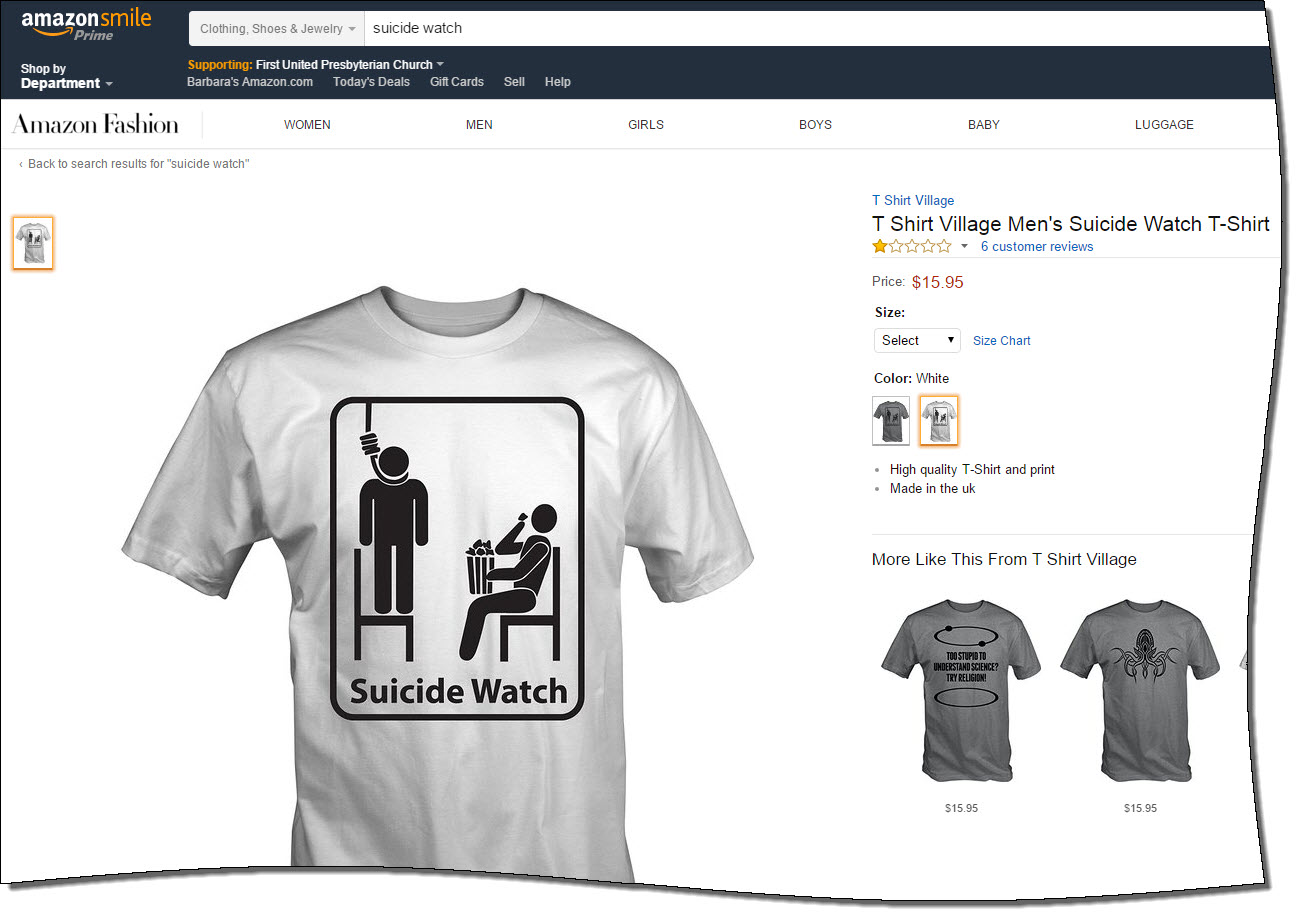
T Shirt Village’s Reprehensible “Suicide Watch” Shirt on Amazon Deserves Negative Stars
This morning on Facebook, I learned from Sam Fiorella about a new shirt from T Shirt Village that’s available on Amazon. And a parent who has lost an adult child, I find this shirt’s mere existence reprehensible. Heck, as a human being, I find it the same.
My heart aches for those who have lost a loved one to depression leading to suicide.
What was Amazon thinking when it allowed this shirt to be sold on its site? I’ll be adding a one-star review for this shirt, but only because I cannot offer negative stars.
For more information on this shirt, please visit “Amazon Contributes to Stigma Surrounding Mental Health” on Sam’s website The Friendship Bench.
How to Get Your Blog Post Shared 1000 Times — by RazorSocial
The fine folks from RazorSocial have published an article with nifty infographic (below) with some excellent tips for creating shareable content. The article is definitely worth a read.

Courtesy of: RazorSocial
Windows 10 & Cisco VPN Client Don’t Play Nicely Together . . . Yet
My #Windows10 upgrade didn’t go as planned, and within 30 minutes, I was able to learn what the problem was and roll back to Windows 8.1.
Thank goodness for old friends and Facebook.

Here’s what happened.
The download and installation appeared to go smoothly, but after booting up with Windows 10, my computer no longer recognized my networking hardware (Problem #1). And when I clicked on the link for the Settings window, the window would appear briefly on my screen, then vanish (Problem #2).
My friend Chuck Hutchings (who I have known since my days at Auburn a “few” years ago) saw my post asked if I had Cisco VPN Client installed, which I do. He let me know that the Cisco VPN Client was the culprit — because he had the same issue. His recommendation? Roll back to Windows 8.1.
That would have been easy to do, except I had Problem #2 also. A quick Google search using my Galaxy Note 4? led me to the Microsoft Community, where another person had the vanishing Setting window, too. I downloaded the recommended troubleshooter to my phone, attached my phone to my computer, then ran the troubleshooter. The troubleshooter fixed the vanishing Settings window, so I was able to the steps Chuck found to go back to Windows 8.1.
Rolling back took fewer than 10 minutes, and everything is now working just like it was before the upgrade debacle.
Now . . . wondering how long until Windows 10 and Cisco VPN Client work together? (I have to use that specific VPN for work, so using another VPN isn’t an option.)
14 Ways to NOT Suck As a Guest Speaker

[Originally published Fall 2010. This post was featured by Lisa B. Marshall in her The Public Speaker podcast. Thanks, Lisa!]
When you’ve been invited to be a guest speaker for an organization’s luncheon or other meeting, you don’t want to be that speaker. And it can be terribly easy to be that speaker: You know, that high-maintenance one, or that boring/irrelevant one. You want to be the one who is memorable for positive reasons. Here’s a list of 14 ways to NOT suck.
- Learn as much as you can about your audience before you speak. (This is a good tip for any public speaking situation.) Even if you don’t know much about the organization beforehand, you can learn a lot during the mealtime, if that’s part of your engagement with them. During the meal, listen more than you talk. When your presentation begins, weave in examples that you know are relevant to this group.
- Find out from your contact at the organization what the norms are for speaking engagements like this one. Will the audience members expect handouts? Is there usually a Q&A session? What’s the best way for you to share your contact information with every audience member?
- Let your contact know what your A/V needs are as far in advance as possible, and only request what is necessary. Avoid last minute surprises, as they often cannot be accommodated — and they turn you into that speaker.
- Plan your presentation so that you can expand it or contract it as needed. Even though you may have been told you have 45 minutes, you may discover that the business portion of the meeting has run long, and you end up with just 30 minutes. Make no mention of shortening your presentation to your audience; just do it. Gracefully.
- Allow extra time in travel to arrive at the meeting location, especially if you have never been there before. Some things to keep in mind: Is there construction along your route? Do you cross train tracks on the way? When do the trains typically stop traffic? Do you know how to get into the parking lot? How far is it from the exterior doors to your meeting room? And never trust your GPS 100% to get you to a new location.
- Know how to use the technology you will be using, inside and out. Practice hooking up all the cords and cables and know how long it will take you. Know how to easily blacken the screen during your presentation when the slides are not needed (in PowerPoint, simply press B to blacken the screen, and then any other key to bring the slide back up). Do you have something new with you? In front of your audience is not the place to learn how to use your new presentation remote.
- Plan for the technology to fail. Always have hard-copy notes for your presentation, just in case you cannot rely on a PowerPoint slide to jog your memory for what to say. Save your presentation as a PowerPoint and as a PDF, and store it on your computer and a USB drive. (Yes, it’s like wearing a belt with suspenders. Twice. And I’m okay with that.)
- Never let your audience see anything on your computer other than the slide deck or other information you intend for them to see. They don’t (or at least shouldn’t) have any interest in watching you boot up your computer, open your file and put it in presentation mode. Keep the projector screen blank until you have your opening slide up. (And never be that speaker who preps her presentation in full view of the whole room while someone else is still speaking; I find this terribly rude to the other speaker.)
- Don’t count on the Internet working 100% perfectly. If I plan to show a YouTube video clip, I always download the video to my computer and show it from there. (I’ve recently been using YouTube Downloader, a free app, and it works quickly and easily for me on my PC.) If I plan to demo a certain website, I’ll use Snag-It to take and save a few screen captures to show in case I cannot access the site during my presentation.
- Provide contact information on each slide or at the end. I like to have a detailed contact info slide as the last one in my slide deck, and I leave that slide up during the Q&A session.
- If you refer to websites or blogs in your presentation, create a set of social bookmarks for your audience so they can go to one URL to find all the links and not spend time during your presentation attempting to furiously scribble down all the addresses. I now use Pinterest for my social bookmarks. Let your audience know early in the presentation where they can find all the links.
- Upload your slides to SlideShare at least a day before your presentation if you want your audience (and others) to have access to them. You can choose to keep the slides private until just before or after the presentation, if you wish.
- The show must go on; be prepared to speak even if you don’t look quite perfect. For example, yesterday, I got caught in a deluge just as I opened my car door arriving at a speaking event. Even with an umbrella, I was drenched (kind of like the cute, wet puppy at the top of this post — at least in my mind). My shoes and blazer sleeves were literally dripping when I entered the venue. What did I do? Dashed into the restroom, grabbed some paper towels, mopped up what I could, and put a smile on my face.
- Arrive with your speaker’s toolkit in tip-top order. I think I almost got a hug from the conference room tech guy at my last speaking event because I had everything I needed, and more. What’s in mine? Here’s what I typically carry with me:
- Computer & power cord
- Power strip
- External speakers with their power cord (just in case there’s no sound system attached to the projector)
- 3.5mm cord to connect speakers to computer (even if I have my Bluetooth-enabled computer and speakers with me, I have the cord as a backup)
- Projector (only if I know that there is not one available for me onsite)
- Presentation remote
- Extra set of batteries for anything that uses batteries
- Hard candy or throat lozenges
- More business cards than I think I could possibly need
So in a large nutshell, these are my 14 best tips on how not to suck as a guest speaker for an organization. What additional tips would you offer?
Personal Branding: A Tale of Two Murrs

This morning, I saw my friend David Murray (AKA Friend Murray, who often calls himself Murr) post a link to a blog post by another David Murray (AKA Other Murray). It seems as though there are two professional communicators by the name of David Murray, and Other Murray seems to believe he’s the Superior Murr, and he says so in his post “A personal branding problem: “David Murray,” if you’re going to play off my brand, step up your game.” He’s wrong.
I think I know why Ragan Communications chose to have my Friend Murray rather than Other Murray speak at an upcoming conference, even though Other Murray has been a writer and speaker for Ragan before. The Other Murray writes about Friend Murray:
“a hapless fatty who doesn’t know what the f*** a pear is, in order to get more likes on social media for an insurance company’s website.”
Really? Sounds rather unbecoming coming from the current editor of Vital Speeches of the Day, doesn’t it?
Which Murr do you think has a tarnished personal brand? And if you were Friend Murray, how would YOU handle this?