Word Nerds Unite: 19 of William Safire’s Best Fumblerules of Grammar

Alte Underwood Schreibmaschine
Image Credit: “Alte Underwood Schreibmaschine” by Peter Mayr

When I was a college student back at Auburn University in the 1980s, my father mailed me a typewritten list he had prepared on his Underwood typewriter. This was a list of some “rules” of grammar that he thought were humorous. I agreed. (We were both word nerds.)

Though I don’t have the specific original sources for each of these, I believe that they all came from William Safire. Some of them are from his “On Language” column in the New York Times, while others are from his book Fumblerules: A Lighthearted Guide to Grammar and Good Usage. Enjoy!

  1. Help stamp out and eliminate redundancies.
  2. Don’t use no double negatives.
  3. Avoid run-on sentences they are hard to read.
  4. Never use a long word when a diminutive one will do.
  5. Surly grammarians insist that all words ending in “ly” are adverbs.
  6. Avoid colloquial stuff.
  7. Proofread carefully to see if you any words out.
  8. Also, avoid awkward or affected alliteration.
  9. Unqualified superlatives are the worst of all.
  10. Use the semicolon properly, always use it where it is appropriate; and never where it isn’t.
  11. Avoid commas, that are not necessary.
  12. If you reread your work, you will find on rereading that a great deal of repetition can be avoided by rereading and editing.
  13. Take the bull by the hand and avoid mixed metaphors.
  14. Reserve the apostrophe for it’s proper use and omit it when its not needed.
  15. Don’t string too many prepositional phrases together unless you are walking through the valley of the shadow of death.
  16. Everyone should be careful to use a singular pronoun with singular nouns on their writing.
  17. A preposition is something you should never end a sentence with.
  18. Who needs rhetorical questions?
  19. Last but not least, avoid cliches like the plague; use viable alternatives.

Job Interviews Over Lunch: 15 Tips for Success

two-pronged attack
Image Credit: “two-pronged attack” by Jenny Downing

If you’re participating in an all-day (or several hour) job interview, it’s likely that you will be eating lunch or dinner with your interviewer(s). Here are just a few tips to help you succeed in this circumstance:

  1. Brush up on the news. There will likely be some “casual” conversation during this lunch interview.
  2. Use your best manners. (This should go without saying.)
  3. Bring along a small notepad and pen. You may need to jot something down during the meal.
  4. If you know ahead of time where you will be eating, review the restaurant’s menu online and choose two or three possibilities.
  5. Order something from the middle price point on the menu.
  6. Choose food that can be eaten with fork and knife, if possible. Avoid potentially messy food (like some sandwiches, soups and salads) and smelly food like onions and garlic.
  7. Order something light or small. You will be doing a lot of talking during this meal.
  8. Food allergies or sensitivities? Try to order something on the menu that you can eat without special preparation by the chef, if at all possible.
  9. If rolls or bread are provided, tear off a small piece (what you will eat in a bite or two) and butter just that. (Do not butter the entire piece at one time.)
  10. Choose something uncarbonated to drink, like water or iced tea.
  11. Be exceptionally polite to the servers; how you treat them is a good sign of how you may treat employees or co-workers.
  12. Avoid overly personal conversation. Don’t say anything you would not say in the interviewer’s office.
  13. Leave your cell phone in your pocket or purse. Don’t take it out even if the interviewer takes his or hers out. (The only exception to this is if you and the interviewer need to look at your calendars for planning a follow-up interview.)
  14. And bring a dental floss pick with you; you can use this if needed when you are in the restroom. It’s better to have it and not need it, than to need it and not have it.

Always remember this one key tip: don’t let your guard down. Even though the setting may seem more informal during a meal, you are still being interviewed and evaluated.

Do you have other tips you’d recommend? Or a story about a lunch interview that went exceptionally well . . . or terribly?

Making the Most of a Phone Interview

old phone ad
Image Credit: Hemeroteca Digital

In these days of travel budgets being slashed to bare bones, many companies are doing more phone interviews than ever. If you’re seeking a new job, it’s highly likely one of your first interviews with a company will be over the telephone. Here’s some of my best advice on making the most of a phone interview:

Before the Interview

  • Know the details of the interview. For example, do you call the interviewer? Or does he or she call you? Be prepared at least 15 minutes ahead of time, and be aware of time-zone differences.
  • Connect with the interviewer via LinkedIn before the interview. Print a copy of the interviewer’s photo and have it available during the call.
  • Whether it’s a cell phone or a landline phone, check to see that the battery is fully charged before you begin to speak.
  • Do your best to be in a quiet place, away from coffee shop chatter, noisy roommates, barking dogs, etc.
  • Silence your cell phone and tablet so that notification noises do not distract you or your interviewer.
  • If at all possible, make or take the call from a landline telephone, rather than a cell phone. You don’t want to have to worry about your call being dropped part-way through. If you must use a cell phone, be sure you’re in an area with exceptionally good coverage.
  • Dress professionally, even though you know the interviewer cannot see you through the phone. We tend to act more professional when we appear more professional.
  • Prepare your interview area carefully. Be seated at a clean desk, and have a copy of your resume in front of you. Also have information about the company printed and available for you to refer to if you need it.
  • Have a cup of water with a straw nearby. It’s best to have no ice.
  • If the interview is done via Skype (or other) video chat, check your equipment with a friend ahead of time to ensure you know how to make or answer the video call. Make eye contact with the camera just as though you were talking face-to-face with the interviewer. Practice this with a friend! It feels quite awkward the first time you try it.

During the Interview

  • Listen carefully to all questions and ask for clarification when needed.
  • Look at the interviewer’s photo during the conversation.
  • Take notes as needed during the interview.
  • SMILE! Though the interviewer cannot see you, he or she will be able to hear the smile in your voice.
  • Some people sound more energetic if they talk while standing rather than sitting.
  • No gum chewing. Though I love to chew gum, I know how awful it sounds to others, and the noise is amplified over a telephone.
  • Avoid typing while talking, especially if you have long nails like I do. The sound of typing may make it sound like you’re not interested enough in the discussion to give it full attention.
  • As the interview draws to a close, express your interest in the role and ask what the next steps in the process are.

After the Interview

  • Immediately after the phone interview, send a short (yet professional) thank you e-mail to the interviewer. Then follow up that e-mail, the same day if possible, with a hand-written thank you note.

Other Suggestions

What other tips would you offer for someone who will be participating in a phone interview?

How to Complete Online Job Applications Without Pulling Out Your (Virtual) Hair

After a little more than five years working with a software company, my position was eliminated, and I found myself in an unexpected state of “retirement.” And “retirement” for me means spending my days searching for what’s next.

Virtually all companies now have you complete an online job application, and some of these applications can take up to an hour to complete. Additionally, some of these applications have screening questions that you must answer before you can submit your application.

Here are some tips to help you complete online job applications:

  • Have one folder on your computer that has just these files in it. This will make it easier for you to find the most current versions. (Move older versions to a subfolder.)
    • Resume (Word and PDF)
    • References (Word and PDF)
    • Transcript (PDF only)
    • Q and A (Word only)
  • In your Q and A file, keep a running log of the screening questions that you are asked and your responses to these questions. If a new application asks new questions, add them to the file.
    • By writing your answers to screening questions in a Word document, rather than directly in the online application, you’ll be able to more easily see any errors that have slipped in.
    • You can often repurpose previous responses with only minor edits.
    • Read your responses aloud to ensure that the words flow smoothly.
    • Carefully copy your responses from Word and paste into the application. Be sure you’re answering the correct question with your response.
    • And if the application times out or errors out before you click Submit, you will have all of your responses saved in Word, so you won’t need to rewrite from scratch! (This tip alone has helped me keep from pulling out my virtual hair.)
  • Typical screening questions are often similar to the following:
    • Why do you want to work here? (Be sure to take a look at the company’s vision and mission statements, and then echo some of the company’s wording in your response.)
    • Explain your experience and skills in X. (X will be something that comes from the job description. Use this space to address how your background matches with what the company’s requirements are. You may be asked this question multiple times to address several aspects of the job.)

What other tips would you add?



Knockout Presentations: How to Design and Deliver

Need to prepare a presentation for work or a community group, or maybe even a conference? Follow my best practices to ensure a knockout (in a good way).

Fidgets & Wiggles & Crochet

Prayer Shawl

When I am in meetings, or other places where it’s expected that people should sit relatively still and “just” listen, I fidget. A lot. (My ADHD meds do help. I know I was much wigglier before I started taking them about 10 years ago.)

If I have a pen/pencil and paper, I tend to doodle.

But yesterday I tried something different to help abate my wiggles and fidgets: I crocheted. It was a simple, repetitive pattern that I have used on many projects, so it was mostly muscle memory I used to complete the stitches. I am confident that I was able to pay closer attention to the speaker because I had something to do with my hands.

I am curious. If someone near you was crocheting or knitting during a meeting (where the participants are 99% listen-only mode), what would your reaction be? And would it be distracting to you?

And a follow-on . . .  If you consider it to be distracting to you, how would it compare to sitting near people who are interacting with their electronic devices during a meeting?

barbara_is_listening

T Shirt Village’s Reprehensible “Suicide Watch” Shirt on Amazon Deserves Negative Stars

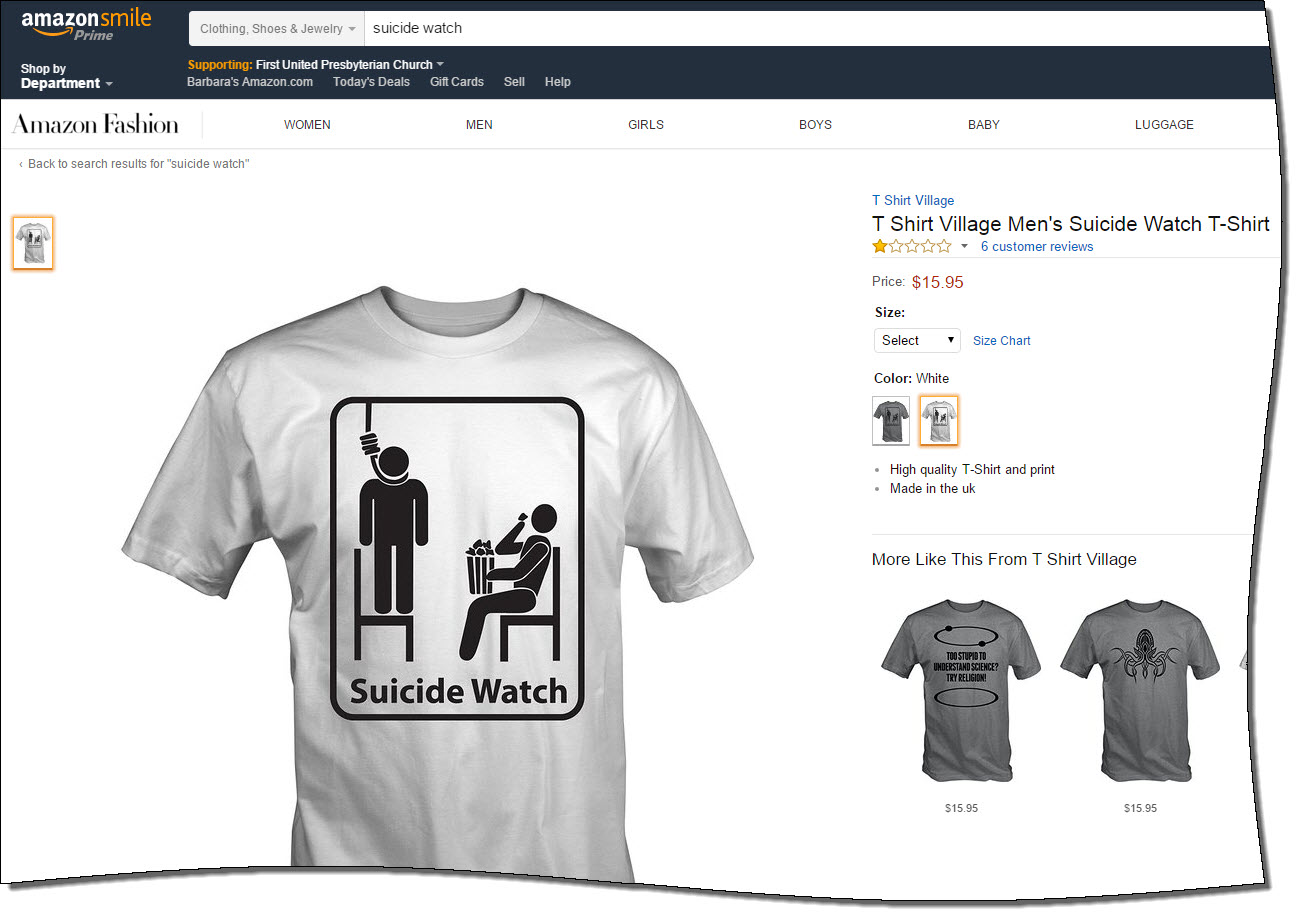
This morning on Facebook, I learned from Sam Fiorella about a new shirt from T Shirt Village that’s available on Amazon. And a parent who has lost an adult child, I find this shirt’s mere existence reprehensible. Heck, as a human being, I find it the same.

Reprehensible Shirt
My heart aches for those who have lost a loved one to depression leading to suicide.

What was Amazon thinking when it allowed this shirt to be sold on its site?  I’ll be adding a one-star review for this shirt, but only because I cannot offer negative stars.

For more information on this shirt, please visit “Amazon Contributes to Stigma Surrounding Mental Health” on Sam’s website The Friendship Bench.

How to Get Your Blog Post Shared 1000 Times — by RazorSocial

The fine folks from RazorSocial have published an article with nifty infographic (below) with some excellent tips for creating shareable content. The article is definitely worth a read.

How to Promote Your Blog Post to Get 1,000 Shares

Courtesy of: RazorSocial

Windows 10 & Cisco VPN Client Don’t Play Nicely Together . . . Yet

My #Windows10 upgrade didn’t go as planned, and within 30 minutes, I was able to learn what the problem was and roll back to Windows 8.1.

Thank goodness for old friends and Facebook.

Image Credit: Digital Trends, 27 October 2009

Here’s what happened.

The download and installation appeared to go smoothly, but after booting up with Windows 10, my computer no longer recognized my networking hardware (Problem #1). And when I clicked on the link for the Settings window, the window would appear briefly on my screen, then vanish (Problem #2).

My friend Chuck Hutchings (who I have known since my days at Auburn a “few” years ago) saw my post asked if I had Cisco VPN Client installed, which I do. He let me know that the Cisco VPN Client was the culprit — because he had the same issue. His recommendation? Roll back to Windows 8.1.

That would have been easy to do, except I had Problem #2 also. A quick Google search using my Galaxy Note 4? led me to the Microsoft Community, where another person had the vanishing Setting window, too. I downloaded the recommended troubleshooter to my phone, attached my phone to my computer, then ran the troubleshooter. The troubleshooter fixed the vanishing Settings window, so I was able to the steps Chuck found to go back to Windows 8.1.

Rolling back took fewer than 10 minutes, and everything is now working just like it was before the upgrade debacle.

Now . . . wondering how long until Windows 10 and Cisco VPN Client work together? (I have to use that specific VPN for work, so using another VPN isn’t an option.)