
Back to Norman

Chuckie Finster, from Nickelodeon's Rugrats

Wow, what a year 2010 has been. On top of moving from the Savannah area to central Florida, here’s what’s been going on:

  • I taught ten, yes – 10, classes during Spring semester: six online for Georgia Southern University and four face-to-face at Southeastern University. That’s about 200 students in seven unique courses, virtually of them all blogging as part of their classes. And I survived to tell the tale.
  • Our daughter was on a rec league team for Miss Lakeland Softball and was then chosen to be a member of an All-Star team. (For those of you who played ball — or parents of those who have — you know what a time commitment this is. At least four evenings a week were taken up with softball.) By the way, I kept the stats book for the softball team.
  • And at the very end of Spring semester, I had the honor of helping my sisters care for my 80-year-old mom at her home in the Atlanta area during her final months. Mom passed away in her sleep at home on May 25. Her memorial service was last week.

Like I said, wow, what a year 2010 has been.

Life is now, as Chuckie Finster from Rugrats would say, “Back to Norman!”

Now to figure out what the “New Norman” is for us.

This summer, here’s what’s going on:

  • I’m teaching three different courses online for Georgia Southern University. (And in the fall, I’ll drop down to part-time online with GSU, but I have been hired on an Assistant Professor of Communication at Southeastern University here in Lakeland.)
  • I’m writing instructor materials (including syllabi, online quizzes, presentations, etc.) for a textbook, because of connections I made on LinkedIn & Twitter with the book authors.
  • Because of a connection I made on Twitter with the PR director at Gateway International Raceway, I’ll get to ride in a pace car during a NASCAR Nationwide Series race in July. Expect lots of tweets and shared photos from that weekend. You didn’t know I’m a NASCAR fan? Then you must not follow me on Twitter, especially on race weekends.
  • Lots of floral photography will happen at Lakeland’s Hollis Garden and Lake Wales’ Bok Tower Gardens. That is, if I can stand the heat and humidity!
  • We’ll take the kiddos to Sea World & Busch Gardens; being Florida residents has some nice perks when it comes to season pass prices.
  • And best of all, my husband and I celebrate our 25th wedding anniversary in July.

Stay tuned. When my family is involved, there’s always more to come.

10.5 Ways for PR Students to Get the Most Out of Twitter

[Originally posted February 24, 2010.]
In the two years that I’ve been using Twitter, I’ve tried my best to get my PR students using Twitter, too. Most of them dutifully complete their One Week of Twitter assignment, then fade away when it’s no longer a requirement.  One week definitely isn’t enough time to “get Twitter,” but the classes I teach aren’t Twitter 101 classes . . .  Twitter is simply a small component of the classes. And the more I make it an assignment, the less they seem to like it.

So this week, I decided to compile a list of reasons and ways PR students can get the most out of Twitter. Maybe if they (you?) see the benefits, it will encourage you to stick with it even when it’s not an assignment.

  1. Write a good 160-character bio. Mention in your bio that you are a PR student and which university you attend. If there’s room left, include some additional information to personalize your bio. I know a lot of PR pros who always follow students back, if they know they are students.
  2. Upload a profile picture. Make yourself look like a human and not a generic bot. I recommend you pick a nice square picture of yourself. When you use a rectangle, it will be cropped, and you have no control over where the crop is. Try to have a picture that looks relatively professional. And by all means, have only YOU in the photo, no significant others or pets.
  3. Help your followers (or potential followers) learn more about you. In your profile, share a link to your blog (if, and only if, you update it regularly) or LinkedIn profile. Newbie mistake: Adding a link to your Twitter profile. Um, the person is already AT your profile page, so it’s kinda superfluous.
  4. Follow PR people. I created a Twitter Starter Pack for PR Students with about 60 engaging people and organizations to follow. Read what they write. Get a feel for how tweets look.
  5. Reply to people. If someone says something thought provoking, send him or her a note back with an @ reply. Even if the person isn’t following you, he or she will see your message. (I tend to follow back more quickly when someone sends me an @barbaranixon to start a conversation with me.)
  6. Introduce yourself. Twitter isn’t like a midddle school dance. You can’t just stand around, leaning on the wall, hoping someone will “ask you to dance.” It’s okay to send tweets to PR pros. And most of them really like it when you do! Let them know you’re a PR student. You may be surprised how helpful many of them are.
  7. Share links to interesting information. I recommend using Bit.ly for shortening links. Bit.ly can change a URL from “http://barbaranixon.posterous.com/a-fordmustang-sandwich-bump-drafting-stopped” to “http://bit.ly/cLCgNG” — this is a huge help when you’re trying to share a long link but don’t want to use up most of your 140 characters with the URL. A bonus? When you sign up for a free Bit.ly account, you get some analytics for free, which means you can tell how many people clicked on your link.
  8. Ask questions. In “real life,” how do conversations work? Lots of times one person asks a question and the other person answers it. On Twitter, if you ask a question, you may be pleasantly surprised at the responses you get, both from PR pros and other followers. Tip: PR pros tend to like to offer advice to PR students.
  9. Connect Twitter to your cell phone. If you can access Twitter from anywhere, it’s more likely that you will use it more often. I have DMs (direct messages) come right to my Palm Pre. And I can send a SMS tweet to 40404, and it will update my Twitter profile automatically.
  10. Twitter isn’t Facebook. And it’s not supposed to be. Twitter is more than a series of Facebook-type status updates. If that’s what you want to do, use Facebook instead. Very few people on Twitter really care that you’re “really really tired today” or that you “just left the gym.”

And now for tip 10.5: Interested in getting more followers? Take a look at your last page of tweets on Twitter.com. Read them carefully. If you didn’t know you, would you want to follow you?

So those are my 10.5 tips. What else would you suggest?

@BPGlobalPR Exposed! (Well, Almost. Kinda.)

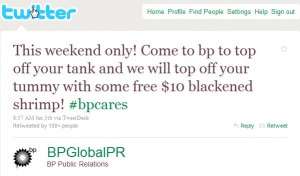
If you participate in the social networking site Twitter, it’s likely that you have come across an account called BPGlobalPR, which has more than 135,000 followers. And if you’re like me, you probably have been thinking, “This account can’t be for real.” I mean, why on earth would BP’s public relations team tweet things like this? Here’s a sample tweet from the account from last week:

Sample Tweet from BPGlobalPR

ABC News’ Dan Harris (virtually) sat down with the person who runs this satirical account to get to the bottom of the story.

Warning: Some of the language in the video is PG-13 (not awful, but not what I’d want to play for my kids).

So what do you think? What should BP’s real public relations executives do about this satirical account?

A Tribute to My Mom, Barbara Anderson

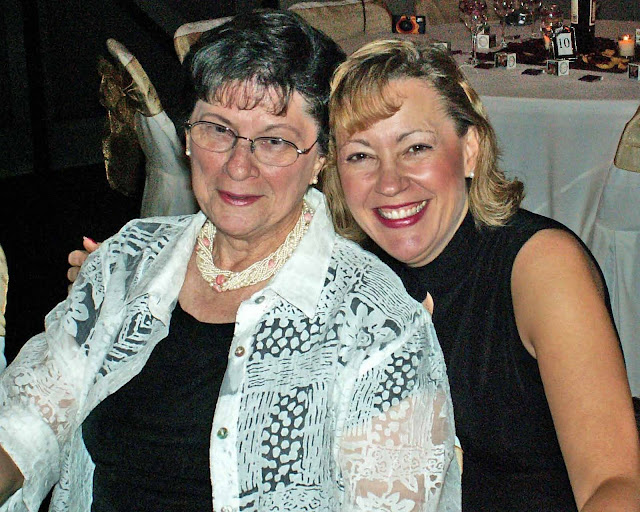
Barbara Anderson & Barbara Nixon (AKA Mom and me)

Barbara L. Anderson

August 16, 1929 – May 25, 2010

Barbara Ann Lindley was born in Chicago, IL, on August 16, 1929, to Avalon and James Lindley. She spent her childhood years in Chicago. During her teen years she was involved in the Eastern Star’s Rainbow Girls and at 16 became a Worthy Advisor.

She is the proud mother of six children: Avalon Braun of Eugene, OR; Thomas Alton of Las Vegas, NV; Nancy Sanchagrin of Orlando, FL; Susan Borchini of Kissimmee, FL; James Anderson of Jacksonville, FL; and Barbara Nixon of Lakeland, FL. Barbara had 13 grandchildren ranging in age from 10 to 34 and three great grandchildren. She was predeceased by a daughter, Kathleen Lee, who died in 1964 from a premature birth.

Throughout her life, Barbara was involved in volunteer activities. In her younger years she was President of the P.T.A., our Brownie and Girl Scout Leader, President of the local Garden Club, and she also started a Mother’s Club in Niagara Falls, NY. She was a Census Taker in 1960 and with her earnings bought camping equipment that started a lifelong love for camping in the Adirondack Mountains, yearly trips to Groton State Park in Vermont and then in Arkansas. Some of our fondest memories were those camping trips.

In Livermore Falls, Maine, Barbara was a Baptist Youth Fellowship Leader, Vacation Bible School teacher and a Deaconess at the First Baptist Church. She also volunteered with the Red Cross.

In her later years, Barbara moved to Atlanta and became involved with Meals on Wheels, Northside Hospital Auxillary (Escort Service), and the Crafty Ladies Craft Group at Christ the King Lutheran Church.

Not long after moving to Atlanta she and her daughter Barbara worked in marketing research together. Her last position was a medical records clerk at the Hug Center/Healthfield in Atlanta. She was first person to retire from the Hug Center.

Barbara had a love for cooking and flowers. You could always find her whipping up a new recipe. She loved to travel and did a lot in her retirement years.

Barbara was well loved by her family and friends and all who knew her. Her sense of humor kept everyone in stitches. She had a lifetime of service to her community and was always willing to lend a helping hand. She will missed by all.

She wanted to make sure that all her friends knew how much she appreciated all the wonderful support she received during her three-year struggle with lung cancer. Her family extends a tremendous sense of gratitude for the kindnesses shown during her illness. With your support, Barbara was given the highest quality of care and love during her last days. Know that she and her family will always be thankful to you all.

Barbara died on May 25, 2010, at the age of 80.

How to Annoy A TV Reporter

This morning, I learned of a video on how to annoy a TV reporter from Jeremy Pepper’s blog POP PR Jots. Though I have known Jeremy (online) for two years now, I thought there was something fishy about this video. I mean, why on earth would Marc Slavin, communications director at  Laguna Honda Hospital, be touching reporter Dan Noyes so much and getting up into Noyes’ face like he did? This had to be something staged, right? I mean, Holy Man-Handling, Batman!

So I did a little looking. And yes, this video IS real. And as they say on The People’s Court, the participants “are not actors.” This situation really happened, and it was caught on tape — and uploaded to YouTube and other sites pretty quickly.

For more stories about the altercation from this video, see:

So, if you’re Marc Slavin (the man-handling communications director), and this video has gone viral, what would you do?

Floral Photos :: In Memory of Barbara L. Anderson

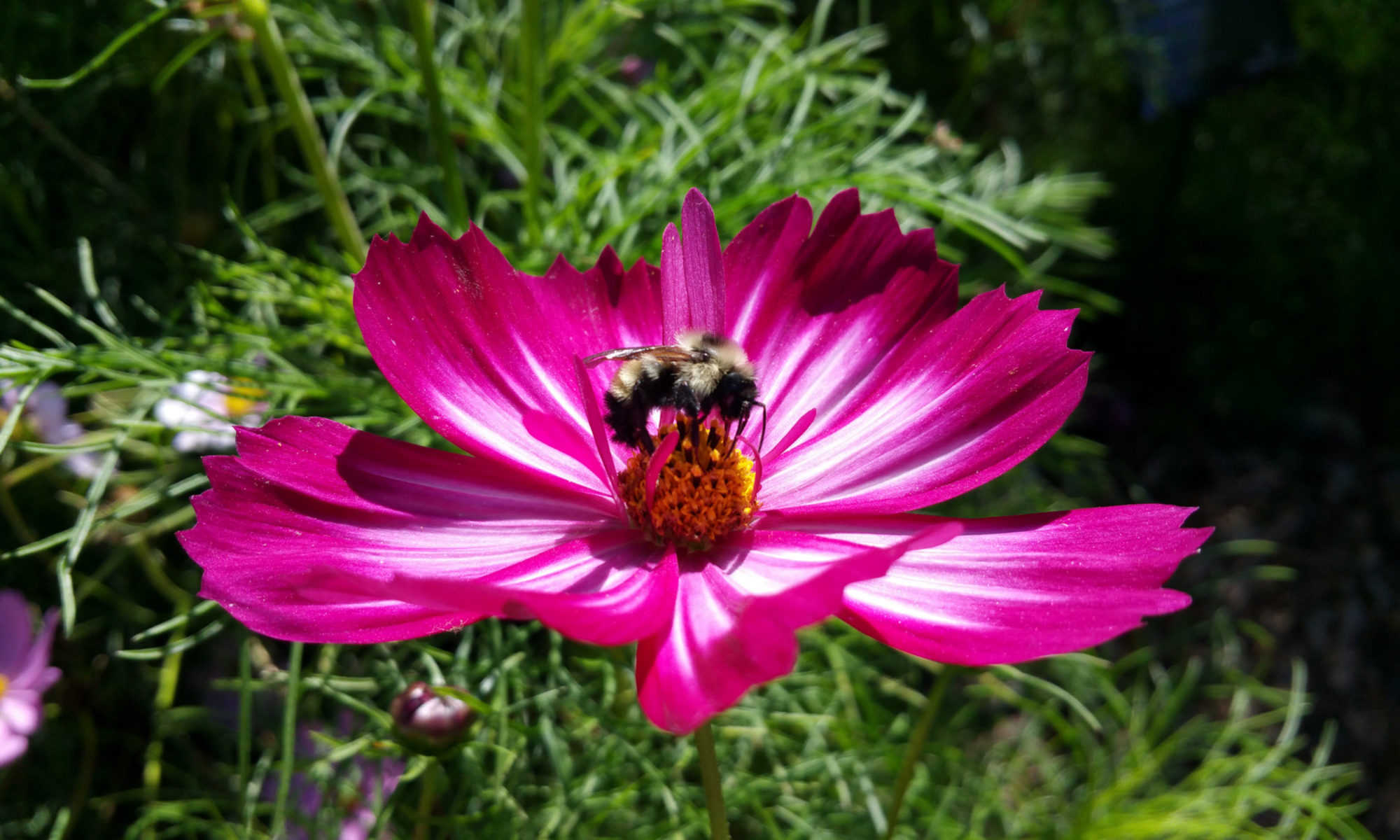
After a several-year battle with lung cancer, my mom (Barbara L. Anderson) passed away in her sleep at her home last night. She loved gardens and flowers. So after I got my kiddos out the door to school this morning, I went to Lakeland’s Hollis Gardens, took a long walk and snapped these photos. I am confident Mom would love all of them — except maybe for the one with the dragonfly on it 🙂

Thank you, Mom, for inspiring in me a love of flowers  . . . and cooking. (I just made her famous Chicken Cacciatore for my family for dinner tonight.)

9 (More) Tips to Help You With Online Summer Classes

We’ve now into Week Two of our Summer 2010 online courses at Georgia Southern University. On a daily basis, I am receiving e-mails from students saying they’re confused about what to do and when. I know that taking online classes is new for most of you. So here are some tips that should help clarify things:

  1. Read all e-mails I send to you at your georgiasouthern.edu account. (Check your e-mail at least once a day.)
  2. If you are having problems with GeorgiaVIEW or Wimba Live Classroom, first try using a different browser. Then try a different computer. If you still have problems, please use the available tech support (GeorgiaVIEW or Wimba) to help you solve the problems. Sometimes I can answer tech support-type questions, but often I cannot.
  3. Read the 10 FAQs About My Online Classes at GSU that I originally posted prior to our first week of class.
  4. Attend the “live” sessions I host, when you can, in the Wimba Live Classroom on GeorgiaVIEW. I know some of you have classes or full-time jobs that don’t allow you much flexibility in your schedule. For that reason, I have recorded ALL of the live sessions I’ve held. However, when I look in the Tracking, I see that just a small handful of students have accessed the archives. There is information I share “live” in those sessions that you may not find elsewhere. It’s in your best interest to attend / watch / listen. (Just like if you miss class for a traditional brick & mortar class you wouldn’t expect the professor to rehash everything for you individually, you should not expect it for an online class.) If you ask me a question via e-mail that I addressed in a live session, I’ll probably refer you to the live session archives to find the answer.
  5. When I schedule a “live” online class, I always send out a meeting notice via Google Calendar. Either accept or decline the notice so I can know how many to expect. (This also lets me know that you received the notice.)
  6. Buddy up with another person in your class. Keep in touch with him/her every few days. Rely on each other to work through issues/questions before e-mailing me. You can see the Roster for your class in GeorgiaVIEW.
  7. Check GeorgiaVIEW for the “regular” (as in non-blog) assignments & assessments. Many times, the brief description of the assignment in GeorgiaVIEW will have a link to the complete description here on my blog.
  8. To know what is expected in your blog, read the Blogging Guidelines for your specific class.
  9. Finally, if you’re overwhelmed by the amount of information available at my blog (some of which may not apply to your specific class), look on the right sidebar of my blog. You’ll see a widget titled “GSU Class Links.” Click on the Category that describes your class, and up will pop ONLY the blog posts that apply to your class.

The main reason I have everything here in one blog is that I have many students who are in multiple classes with me. It makes sense to centralize the information so no one needs to remember where to go to find their information. As long as you remember to click on the Category of your class, you should find my blog easy to navigate. And who knows, you may even learn something be reading about what is going on in other classes.

If you are one of my summer PR students, please reply to this blog post with a comment so that I know that you’ve read it. Thanks!

PRCA 3330 Student Blogs :: Summer 2010

As of 10:45 a.m. on May 27, this is the listing of student blogs in my summer 2010 PRCA 3330 (Public Relations Writing) class. If you are a student in this class and your name does not appear on the list, please be sure complete this Google Form.

PRCA 2330 Student Blogs :: Summer 2010

As of 11 a.m. on May 27, this is the listing of student blogs in my summer 2010 PRCA 2330 (Introduction to Public Relations) class. If you are a student in this class and your name does not appear on the list, please be sure complete this Google Form.

10 Blogging Tips That Will Change Your Life (or Grade, at least)

Originally published on 9 December 2009 & featured in Ragan’s PR Daily. Updated on 20 May 2010. Updates are in italics.

Over the past few semesters, I had nearly 450 of my students blogging as part of their grades in public relations courses. And this semester, I have more than 75 more. Based on their experiences and mine, here are some tips for maintaining your blog (especially when it’s graded as an assignment):

  1. Your professor may require a certain amount of posts on specific topics and perhaps even a specific length. Follow these guidelines to a T. Refer to the assignment sheet/post often to be sure you’re doing what’s needed.
  2. There may be interim deadlines for your blog posts. Keep up. Even if there aren’t interim deadlines, blog throughout the semester. If you do all your posts toward the end (or even the day they’re due), it’s not to your advantage. It will appear as though you procrastinated. Your readers will likely not read more than a post or so a day, so piling a bunch into one day actually hurts your readership.
  3. Make an editorial calendar for yourself based on the blog requirements. Consider using Google Calendar to keep track of posts you intend to write and when they should be written. (Google Calendar can even send you text message reminders.)
  4. Stuck for topics? Ask your readers at your blog what they’d like to see, or ask your followers on Twitter for help. Read Ragan’s PR Daily and listen to PR podcasts for additional ideas.
  5. Proofread. This should go without saying, but since I’m saying it, it apparently doesn’t. Misspelled words and poor grammar significantly detract from your credibility. If you know you’re not a great speller, then write your posts first in Word, where SOME misspelled words and grammar errors show up more easily. Partner with a friend and proof each others’ posts, too. (NOTE: If you write in Word first, be sure to use WordPress’ “Paste from Word” feature, or else you will end up with some really ugly formatting.)
  6. Write in short paragraphs. Long paragraphs are really grey and hard on the reader’s eyes.
  7. Use photos licensed by Creative Commons to add visual impact to your blog. I recommend Compfight for finding images.
  8. One of the best ways to become a better blogger is to read & comment on others’ blogs, too. It’s not all about you. Once you start commenting on others’ blogs, you may notice that your readership will increase (because of people clicking on your name in the comment and finding your blog.)
  9. Change the name of your blog from whatever WordPress “gave” you as the default (which may be something like Bnixon13’s Blog) to something more professional and interesting. Though you cannot change the URL for your blog, you can easily change the name. And definitely change or get rid of the default tagline “Just another WordPress weblog,” which screams N00b.

Yikes! I promised you 10 tips, and I only gave you 9! I need your help. What’s one more tip you’d provide to round out this top ten list?

barbara_is_listening

.