At the 80th Annual Convention of the Southern States Communication Association, I am contributing the panel discussion “Social Media and Public Relations: Twittering and Beyond.” Below, you will see the brief Prezi I created to frame my comments about how Twitter has helped to make me a better public relations professor.
How Twitter Makes Me a Better PR Professor on Prezi
Notes
UPDATE from April 14: My notes for the presentation appear below.
Collaborate {with Peers}
I simply can’t recall what it was like starting out as a new PR professor 20+ years ago at McNeese State University, not having the ability to bounce ideas off of other PR professors around the world in mere moments. Now not a day goes by that I don’t collaborate with professors on syllabi, assignments and more. Some of those whom I stay in touch with most often include:
- Auburn University’s Robert French (founder of PR OpenMic)
- St. Edward’s Univerity Corinne Weisgerber (with whom I collaborated using a wiki to develop a new Social Media for PR class)
- University of Georgia’s Karen Russell
- University of Oregon’s Kelly Matthews & Tiffany Gallicano
- Marquette University’s Gee Ekchai
- and many more
Converge {with PR Pros}
Part of my role as a PR educator is to prepare students for the “real” world of public relations. By weaving in ideas from successful PR practitioners into my classes, I am making sure I am teaching my students things that will help them in their entry-level roles. I am often surprised and delighted by seeing my students reaching out directly to PR pros on their own, too. For example, Mackenzie Stratton did her Social Media for PR podcast by interviewing Socialnomics author Erik Qualman over Skype. Other PR pros who are especially helpful to students are
Connect {with Students}
My students have learned that the quickest way to get an answer from me is to tweet (either through an @ or DM). If I notice that several students are asking me similar questions, I’ll respond with a tweet to their class, using the class’ designated hashtag. Sometimes, however, I do have to let my students know that even though I may be using Twitter late into the evenings, I am “off the clock” and will get back to them later.
{peek into the back} Channel
I love seeing my students help each other out by answering each other’s questions on Twitter.
{Keeps Me} Current
Though I have considered myself a news junkie for years, I tend to learn about breaking news (especially in the world of PR/social media) via Twitter. I frequently weave today’s current events into the classes I teach, and it’s much easier for me to get my news now.
I also discussed some of the social media fiascoes that have occurred (including Disgusting Domino’s Employees, #PepsiFail and Motrin Moms) and the Mumbai crisis.
Communicate {Concisely}
Since Twitter only allows 140 characters to share our messages, I have had to work on being less wordy. I find that when I plan mini-lectures in my classes, I design several “tweetable” segments, in case my students happen to be tweeting in class.
After our panel discussion was over, the real conversation in the room began. Our audience asked lots of great questions, including those around the blurring of personal and professional parts of our lives. I shared that in my first-year experience class (Making Connections: Facebook & Beyond), one of the assignments is for students to create their own Social Media Policies, clearly defining how and why they use different types of social media.
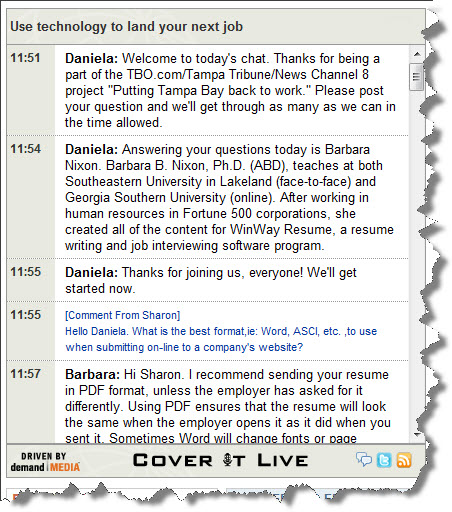
Today I was invited by the Tampa Tribune and TBO.com to share my expertise regarding social media and the job search. Here’s a transcript of the live chat we held at noon, using CoverItLive.
Many thanks to Chris Taylor, AKA @TBOChris, for inviting me to the studio, to Daniela for moderating the chat, and to my longtime Twitter friend & Tampa Tribune writer Jeff Houck (@JeffHouck) for inviting me to lunch at The Taco Bus after the chat session.
|
Use technology to land your next job
|
|
11:51
|
|
|
11:54
|
|
|
11:55
|
|
|
11:55
|
|
|
11:57
|
|
|
11:57
|
|
|
11:58
|
|
|
11:59
|
|
|
12:00
|
How did you find out about this chat?
TBO.com homepage ( 14% )
News Channel 8 ( 57% )
Tampa Tribune ( 0% )
( 0% )
( 29% )
Other ( 0% )
|
|
12:00
|
|
|
12:01
|
|
|
12:03
|
|
|
12:04
|
|
|
12:04
|
|
|
12:05
|
|
|
12:05
|
Have you been using LinkedIn in your job search
Yes, I use it all the time. ( 17% )
No, I don’t even know what it is. ( 33% )
Sort of.. I created an account but don’t use it. ( 50% )
|
|
12:08
|
|
|
12:08
|
|
|
12:09
|
|
|
12:12
|
|
|
12:15
|
|
|
12:16
|
|
|
12:17
|
|
|
12:18
|
|
|
12:19
|
|
|
12:21
|
|
|
12:24
|
|
|
12:26
|
|
|
12:28
|
|
|
12:30
|
|
|
12:34
|
|
|
12:35
|
|
|
12:36
|
|
|
12:36
|
Do you have a twitter account?
Yes, and I use it all the time. ( 50% )
Yes, but I never use it. ( 25% )
No, I need to create one. ( 0% )
No, and I don’t plan on creating one. ( 25% )
|
|
12:37
|
|
|
12:38
|
|
|
12:42
|
|
|
12:43
|
|
|
12:44
|
|
|
12:44
|
|
|
12:44
|
|
|
12:45
|
|
|
12:46
|
|
|
12:48
|
|
|
12:48
|
|
|
12:49
|
|
|
12:50
|
|
Our One Week of Twitter assignment begins on Thursday, January 28, and will end at midnight on February 4. Your blog post about this experience is due before class on February 9. It will count as your Topic of the Week for Week Five.
Setting Up Your Twitter Account
- Go to Twitter. Click Get Started, and sign up. I prefer it if you use some version of your first and last name as your Twitter ID. (Avoid putting numbers in your Twitter ID, or you may appear like a spammer.)
- Upload a photo or avatar.
- Write a brief (140-character or fewer) bio. It’s good to mention that you’re a PR student.
- Send a tweet saying “I’m a student in @barbaranixon’s #COMM2322 class”. Be sure to include the #COMM2322 indicator, with no spaces between the hashtag (#), letters and numbers.
- If you haven’t already done so, complete my form that tells me your Twitter username.
Setting Up Your Following List
- While you are logged into your Twitter account, visit my Twitter List for COMM 2322. Everyone you see in this list will be classmates of yours at Southeastern University.
- Click the “Follow This List” icon just above the list. Voila! Now you are following the list. To easily/quickly follow your classmates as individuals, see my TweepML list.
- Follow at least 20 (why not all?) of the people or organizations in my Twitter Starter Pack for PR Students.
- Over the course of the next week, send at least twenty tweets (Twitter messages of 140 characters or less). Tip: Rather than tweeting that you’re having ramen for lunch, instead consider what might be of interest to your classmates and followers. Perhaps point others to something interesting or funny you read online. Share a fact you learned in a class. Maybe you could even pose a question that you’d like others to answer.
Additional Information
- Review my tips on how college students can use Twitter to their advantage and Choosing Whom to Follow on Twitter: My Strategy.
- Review Prof. Sam Bradley’s College Student’s Guide: Twitter 101.
- I find using the web interface for Twitter to be clunky. I prefer using TweetDeck, a free Adobe Air app that works great on PCs and Macs.
- I’ll occasionally post information on Twitter and use the hashtag of #COMM2322. By using this hashtag, I’m indicating that I want students in this class to pay special attention to the tweet.
- OPTIONAL: If you’d like to publicize your blog posts via Twitter, you can it automatically in WordPress.
Blog About Your Experience
After the week is over, add a 250-word (minimum) post to your blog about the experience and what you got out of it. Be sure to include at least one way you might find value in continuing your account in Twitter. This blog post is due before class on February 9. (This post will count as your Topic of the Week.)
Questions? Just send me a DM (direct message) or an @ (reply) in Twitter!
NOTE: Many thanks to Kaye Sweetser and Karen Russell for their ideas prompting this assignment.
Take about an hour and watch “Twitter for Business,” a webinar led by Laura Fitton (author of Twitter for Dummies.) This webinar is part of Hubspot’s Inbound Marketing University, a series of 16 talks by people prominent in the social media space.
The slides from the presentation are below, in case you want to see them before you listen to the webinar; the slides are shown along with the audio in the webinar, however. (This means, if you want the audio, you’ll need to listen to the webinar, not just click through the slides below.)
If you are a student in one of my classes this semester, please let me know your Twitter username using the form below. Fill this out even if you know that I am already following you.